
Plugin Station: The One Studio Tool That Should Have Existed Years Ago
You spent hundreds, maybe thousands, on plugins to make records. But every plugin you add is also one more thing that can derail a session right when you finally get some momentum.
A missing license. An outdated version. The wrong format. Or my personal favorite: you installed the plugin, but your DAW is acting like the two of them have never met.
That is why Plugin Station has become such a useful part of my studio. It is not another compressor, EQ, or secret sauce processor. It helps organize the plugin collection you already own, so maintaining that collection stops eating the time you set aside to make music.
I have been using it for roughly six months, and I genuinely have a hard time imagining going back. Think of it as insurance for your studio workflow: not a guarantee that nothing will break, but a way to stop treating every plugin problem like a brand-new mystery.
Key Takeaways
- Plugin Station centralizes your plugin inventory, update information, and compatibility details to make maintenance less scattered.
- System profiles help you rebuild a studio computer and compare plugin installations across machines.
- A dedicated license key manager reduces the hunt through old receipts, emails, and purchase records.
- Plugin Station is Mac only, and cross-project plugin usage scanning remains a potential future feature.
The Real Cost of Plugin Problems Is Lost Momentum
I started as a guitar player trying to get the records in my head to come out of the speakers. That turned into the familiar DIY producer journey: recording my own bands, spending money I probably should not have spent on gear, going to audio school, doing internships, and staying up too late trying to figure everything out.
Later, working at URM Academy and alongside my mentor on major label records for bands like Erra, Hail the Sun, and Limbs, I started seeing the same lesson on a bigger scale: your knowledge and tools cannot help much when the session has stopped working.
And the troubleshooting routine is painfully familiar.
- Open one plugin company’s website, then another, then another.
- Try to access an account you have not touched since a Black Friday sale six years ago.
- Reset the password and wait for an email that may or may not show up.
- Search your inbox for serial numbers, activation details, and receipts.
- Try to remember whether you bought directly from the developer or through a reseller.
Before long, you are searching for “serial,” “license,” “activation,” and “download” like a raccoon digging through a dumpster.
A new computer or system crash makes this even worse. Now you are rebuilding your entire plugin collection from memory, opening old sessions one at a time to discover what you missed, and checking whether everything is activated.
That does not just waste an hour. It burns the little window where you knew exactly what the track needed. You went from making creative decisions to being the studio’s unpaid plugin maintenance department.
See Your Entire Plugin Collection in One Place
The first thing Plugin Station does for me is simple: it shows me what is actually installed on my computer.
That matters because troubleshooting is much harder when the information is scattered across folders, installers, and developer portals. Before you can sort out an outdated version, a duplicate installation, or a format issue, you need a clear picture of what is there.
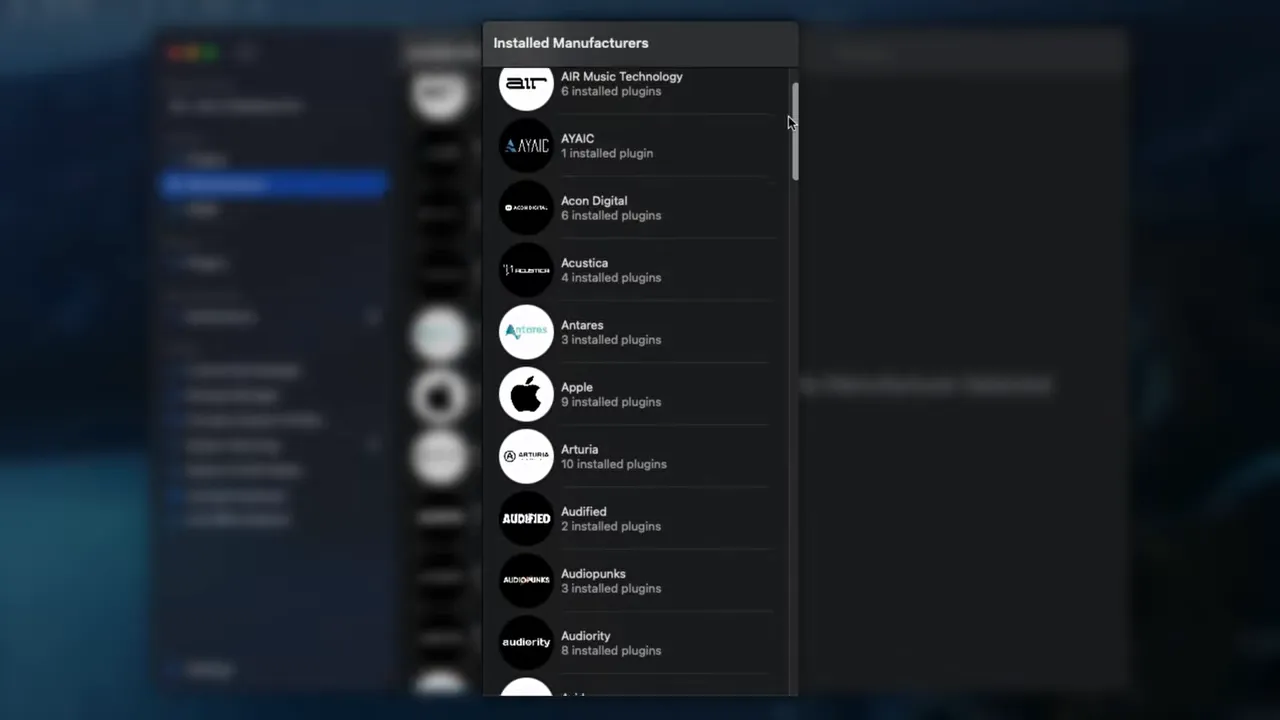
Plugins are easy to ignore while they are working. A session might open perfectly for months, then an update to a plugin, your DAW, or your operating system changes something and suddenly the whole thing starts acting weird.
Plugin Station brings update and compatibility information into the same place as your plugin inventory. Instead of discovering a potential problem in the middle of a session, you can see what needs attention while the system is still behaving.
The useful shift is from reacting to problems to having visibility before they interrupt you. That is a lot better than playing plugin roulette and hoping the next session opens normally.
Make a New Computer a Rebuild, Not a Scavenger Hunt
Getting a new studio computer should be exciting. In practice, it can turn into days of hunting for installers, logging into old accounts, fighting licenses, and opening projects just to find out which plugins you forgot.
Plugin Station’s system profiles give you a record of what was installed. They also point you toward the official installers you need, which turns that vague “I think I had everything” process into something you can actually work through.
The distinction matters. A system profile gives you an inventory to rebuild from. You are not relying entirely on memory, or waiting for an old session to complain before you discover the next missing plugin.
For me, that feature alone is incredibly valuable. If you have ever lost a whole day rebuilding a studio machine, you already understand why. The exciting part of a new computer should not be followed by an archaeological dig through your purchase history.
Give Your License Keys Somewhere Sensible to Live
Not every plugin uses the same licensing system. Some licenses live in iLok. Others involve serial numbers scattered across emails, receipts, PDFs, user accounts, screenshots, and whatever random note you made during a sale.
That fragmentation becomes especially annoying during a rebuild. Finding the installer is only half the battle if the activation information has disappeared into eight years of order confirmations.
Plugin Station includes a license key manager that gives those keys one secure place to live. When you need a serial number, you know where to look instead of becoming a producer archaeologist.
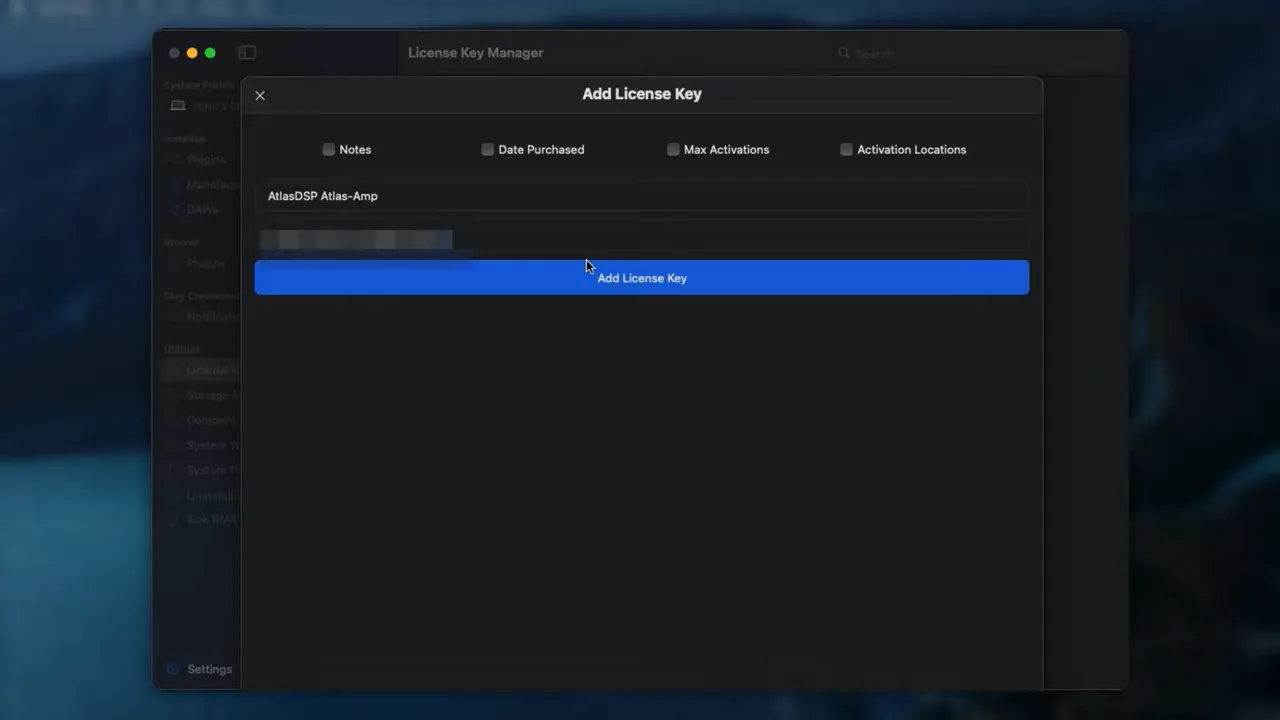
This is not about pretending every developer’s licensing process is identical. It is about organizing the information you need so those different processes do not each become a separate treasure hunt.
Find the Plugin Clutter You Have Been Afraid to Touch
Once you can see what is installed and where your licenses are, another problem becomes obvious: all the stuff you have kept because you were not sure what was safe to remove.
Plugin Station helps show:
- What is taking up space in your plugin collection.
- Which formats you may not need for your setup.
- Where duplicate files are sitting without doing anything useful.
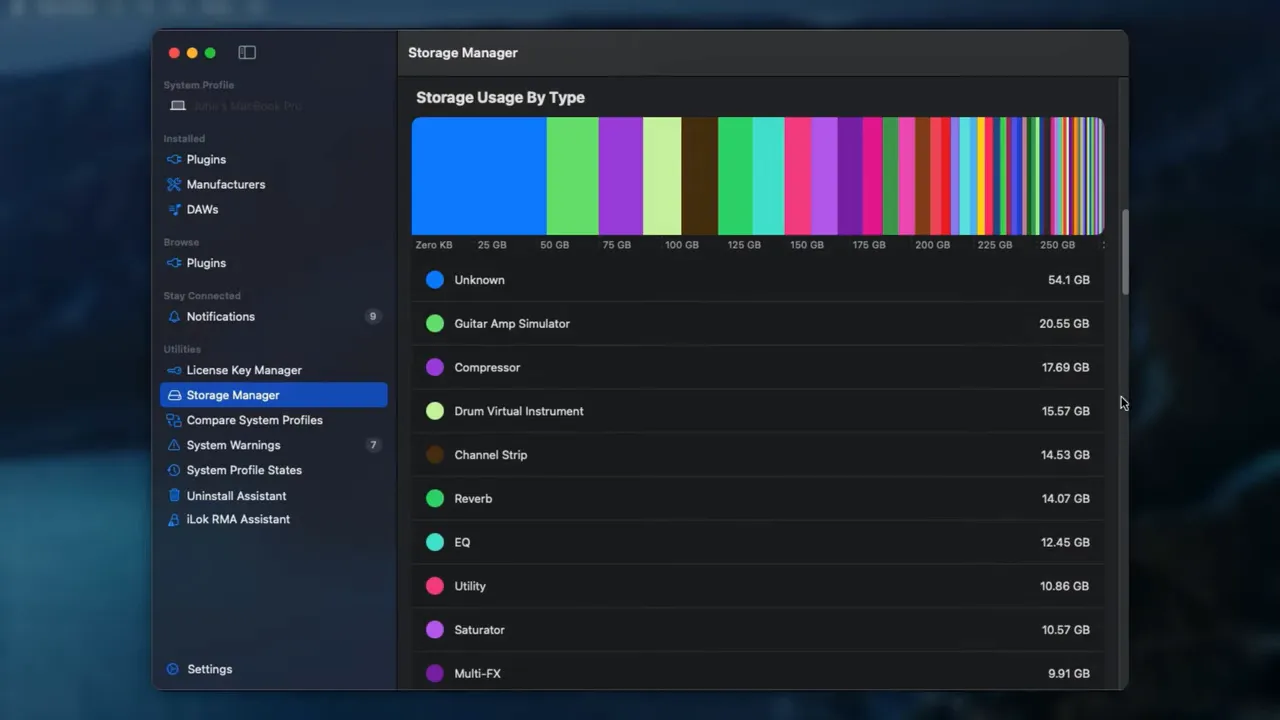
The point is not to start deleting everything that looks unfamiliar. It is to replace guesswork with visibility. When you can see the collection clearly, you have a much better starting point for deciding what needs to stay and what is just clutter.
Keep Your Studio Computer and Laptop on the Same Page
If you use both a studio machine and a laptop, you have two plugin collections to maintain. And they have a habit of drifting apart.
You take the laptop somewhere, open a session, and there it is: a missing plugin. Now you need to find the installer, install it, sort out activation, and make sure everything works before you can get back to the track.
Plugin Station lets you compare system profiles so you can check whether both machines have the same plugins installed.
That moves the discovery of missing plugins to a much better time: before you leave the studio. It is a straightforward feature, but it addresses exactly the sort of avoidable interruption that can wreck a limited block of music-making time.
A One-Person Developer With Realistic Answers
Part of what makes Plugin Station stand out to me is that it feels built around problems producers actually have, rather than an idea somebody came up with in a meeting.
It is also a one-person operation. Julian is the owner and developer, but he is also answering questions, taking feedback, updating the database, explaining solutions, and discussing what might come next.
That matters when you look at both the current limitations and the requested features.
Why It Is Mac Only
At the time of this review, Plugin Station is Mac only. Julian’s explanation is refreshingly direct: he is one person, the Apple platform is what he knows, and that is what he built first.
A Windows version becomes more realistic if the Mac version does well enough to support that work. That is not the same as a promised release date, and I appreciate the honesty. Windows producers wanting it makes complete sense. They have the same maintenance headaches.
Unrecognized Plugins and Project Scanning
When people ask about plugins appearing as unrecognized, Julian explains what is happening and has shipped updates to make those entries easier to show, hide, and manage.
Another request is the ability to scan projects and identify which plugins are actually used across multiple sessions. That sounds simple until you think about all the different DAWs involved.
His response has been that he wants to do it, but it is challenging and likely to depend heavily on the DAW. That is a potential future feature, not something to assume the app already does.
I would rather hear a realistic explanation than a vague promise that something is “in the pipeline” forever. Knowing the purchase supports one person continuing to develop the tool, maintain the database, and answer questions adds value for me.
Boring Software Can Protect the Most Important Part of Your Studio
Plugin Station sounds boring. Really boring. It does not make your snare hit harder or give your guitars more attitude.
But once you have lost a productive session to missing plugins, scattered licenses, or a painful computer rebuild, boring starts to look pretty valuable.
What I like is not the idea of spending more time managing plugins. It is the opposite: having a clearer inventory, organized license keys, useful system profiles, and a way to compare machines means less time thinking about all this stuff.
Plugin maintenance is only one of the tedious jobs that steals studio time. For a broader set of system optimizers and workflow shortcuts, I put together the free Studio Supercharger Cheat Sheet with tools used by professional engineers to keep their studios moving.
|
The goal is not a perfectly organized plugin collection for its own sake. The goal is to keep the session moving long enough to do the important part: make the record.
Made with VideoToBlog using The ONE Studio Tool That Should've Existed Years Ago